
(15.09.2020)
I have been looking into ways to make the system more user friendly. The way it worked in the past is that all of the information is preset and then hidden, the operator simply ran the application, and then stopped it at the end. This is fine if you know what ip adress the server is on and what OSC port each module is responding to. However it does not make the system paticularly user friendly, and could slow down troubleshooting. As a result i decided to overhaul the server software to create a more friendly user interface (or GUI).
I decided to keep the interface simple, Displaying only valuable pieces of information. as for what to display I settled on 5 key pieces of information: The IP adress, OSC port, The Module Name and port, and finally a cue label. The first two are self explanitory as they are used to send triggers to the server. The module name and port is useful during the initial setup to ensure that the correct cue is going to the correct module, the wrong module port is probably the most common setup issue as (like IP adresses) it is assigned and not always the same, so it is useful to have it displayed as it can show issues before they happen. On the surface the cue label seems fairly self explanitory as a useful piece of information for the operator but there is also a second purpose in the sense that it shows if the server is actuyally recieveng the cues being sent, again aiding troubleshooting dueing initial setups.
The user interface now looks like this:
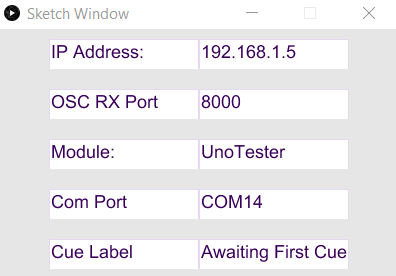
Although this is a massive improvement over what was there before, I am still not completely satisfied with it. For the next update I would like to add in the capability to set the port by typing it into the GUI, likewise for the COM Port, cue and module names, all of these are currently set at the sofware level, not at the end user level.
 Ethan Kent Lighting Design